How to Interpret Plagiarism Results with Plagius
Plagius is a useful tool for detecting plagiarism, but it should always be used together with manual review.
An automated system such as Plagius cannot confirm plagiarism on its own. Only a manual review can confirm the actual occurrence of plagiarism.
Below are some practical guidelines to help you interpret Plagius results more accurately.
How to interpret the analysis results
Even though Plagius provides a lot of information in the analysis report, the best approach is still a manual review of the highlighted passages.
If many highlighted phrases appear close to each other, there is a good chance that the section was copied. On the other hand, isolated highlighted phrases usually have a lower chance of being plagiarism.
See the example below: there are passages without suspicion, one paragraph with strong suspicion, and another paragraph with only one isolated suspicious sentence:
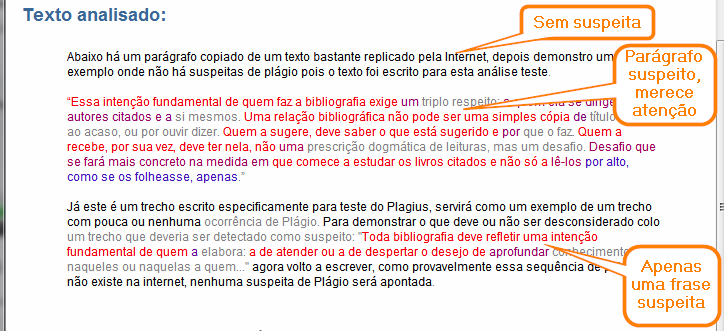
In this evaluation, remember to disregard quotations. Plagius does not reliably detect them, so quotations may also appear as suspicious passages.
To avoid mistakes when claiming plagiarism, suspicious passages must be manually verified. Make sure the highlighted text actually exists at the addresses shown in the result.
☛ Why it is a mistake to use percentage to measure plagiarism
The percentages shown in the results
The analysis result displays several indicators and percentages. Here is what each one means:
Internet Suspicion: Indicates how much of the text was found at some Internet address. This percentage comes exclusively from searches performed on services such as Google and Bing. It does not necessarily mean plagiarism, since the page may have changed or may no longer exist.
Confirmed Suspicion: Indicates the percentage of suspicious expressions that could be confirmed. Confirmation happens when Plagius is able to open the address found and verify that the suspicious passages actually exist there.
Local File Suspicion: Indicates how much of the text was found in files on your computer.
Analyzed Text: Shows the percentage of the text that could actually be analyzed. Plagius does not analyze all types of passages, such as very short phrases, special characters, line breaks, images, tables, and charts.
Analysis Success: This is useful to verify whether the analysis was successful. Connection errors or a canceled analysis can compromise the result, so this value should be close to 100% if you want to trust the report.
Percentages are only statistical indicators. They cannot be used by themselves to confirm plagiarism, because a sentence that already exists on the Internet is not always plagiarism. Citations are a common example: the more citations a text contains, the higher the suspicion percentage may be, even when those citations are properly referenced.
Therefore, when there are citations, the suspicion percentage may be distorted.
Variation between different analyses for the same document
It is normal for the percentages to vary between one analysis and another, because the search phrases are built randomly and search engines are also chosen with some randomness.
This variation does not usually compromise the practical value of the analysis, because the highlighted passages tend to remain similar.
When is there actually plagiarism?
This question often depends on academic, editorial, or legal criteria. In practice, however, plagiarism usually requires proof.
That proof is typically established by showing the original text and where that same text was inserted into the document under evaluation without proper attribution.
Sometimes even a single copied sentence without proper credit may already characterize plagiarism.
Colors in the analysis results
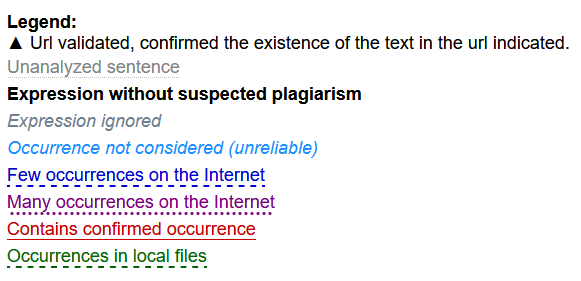
In the analysis result, the generated text appears in multiple colors, ranging from black and gray to shades between blue and red.
Gray passages were not searched, usually because they are too short or contain elements that prevent analysis. Black passages were searched properly, but no suspicious occurrence was found.
In general, the closer a passage is to red, the greater the number of Internet occurrences found for that text.
The result screen also includes a Legend button that helps you remember the meaning of the colors:
Other tools in the results
On the right side of the results screen, you will see a list of all addresses found during the analysis.
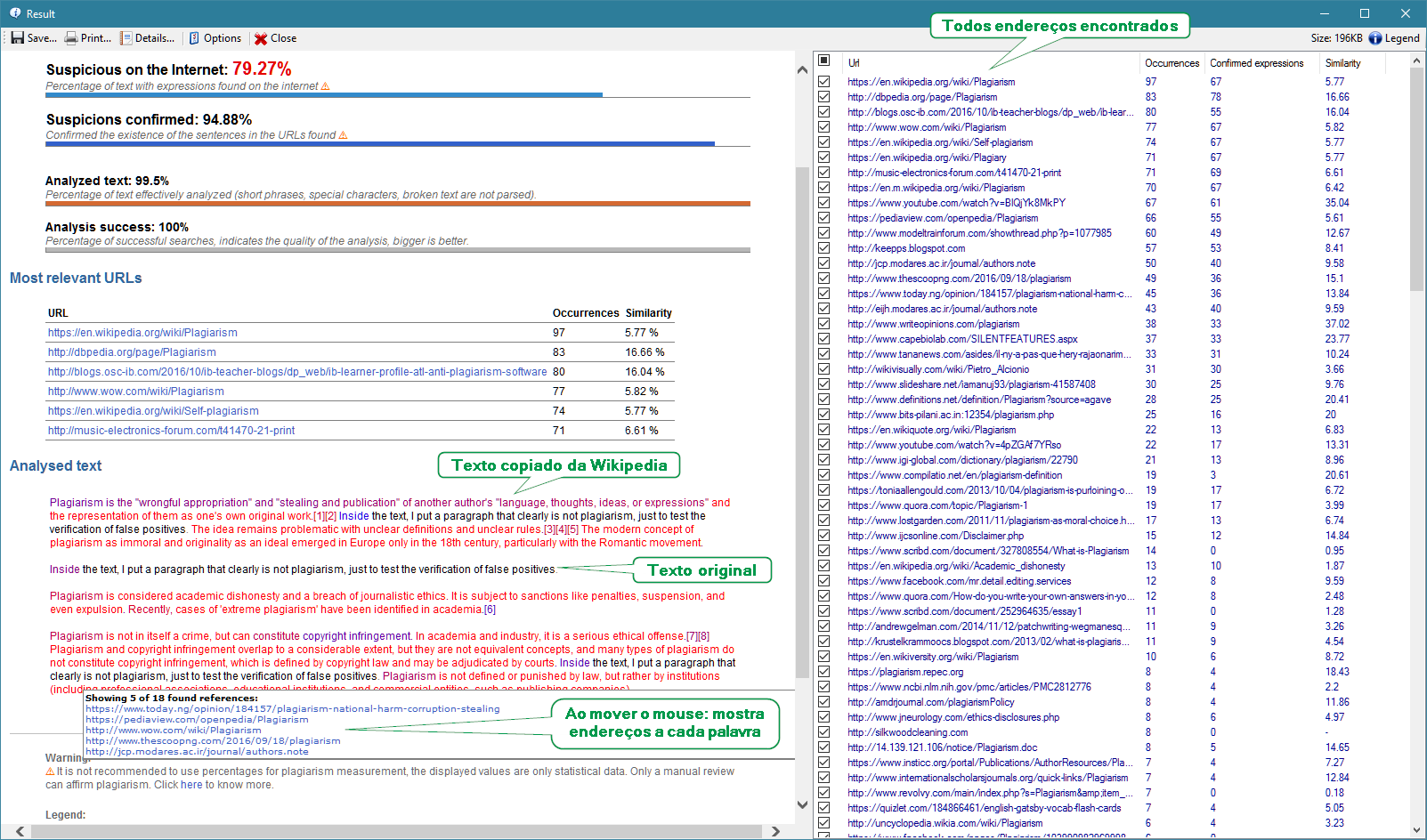
Checked addresses are considered in the construction of the result on the left side, creating a link between the highlighted text and the selected address.
The user can check and uncheck addresses, and the changes are applied immediately, updating both the highlights and the percentages.
This gives the user a practical way to discard false positives or compare the text with a specific set of addresses.
Other approaches
Besides looking at the highlighted text, it is also useful to check the addresses with the highest number of occurrences. These are often strong candidates for a deeper manual review.
Direct comparison
In the same list, if you right-click an address, Plagius shows the Compare option. This feature opens the content of the address and highlights the sequences of words that match the analyzed document.